Reporter configuration
Start with Getting started and configure either a webhook or a bot. This page describes options for the Playwright reporter. The CLI uses a separate JSON configuration and different names for some options.
Configuration example
This advanced bot configuration adds routing destinations, a custom layout, metadata, and threaded details. Define the named generateCustomLayout export using the custom layout guide.
  import { generateCustomLayout } from "./my_custom_layout";
  import { LogLevel } from '@slack/web-api';
  ...

  reporter: [
    [
      "./node_modules/playwright-slack-report/dist/src/SlackReporter.js",
      {
        channels: ["pw-tests", "ci"], // provide one or more Slack channels
        sendResults: "always", // "always", "on-failure", "on-flaky", "off"
        layout: generateCustomLayout,
        maxNumberOfFailuresToShow: 4,
        meta: [
            {
                key: 'BUILD_NUMBER',
                value: '323332-2341',
            },
            {
                key: 'WHATEVER_ENV_VARIABLE',
                value: process.env.SOME_ENV_VARIABLE, // depending on your CI environment, this can be the branch name, build id, etc
            },
            {
                key: 'HTML Results',
                value: '<https://your-build-artifacts.my.company.dev/pw/23887/playwright-report/index.html|📊>',
            },
        ],
        slackOAuthToken: process.env.SLACK_BOT_USER_OAUTH_TOKEN,
        slackLogLevel: LogLevel.DEBUG,
        disableUnfurl: true,
        showInThread: true,
      },

    ],
  ],
Options
channels
An array of Slack channel names or IDs for bot delivery. Provide at least one destination for each enabled outcome, either through channels or the outcome-specific arrays below. Webhooks use the channel selected when their URL was created.
onSuccessChannels
(Optional, bot only) An array of Slack channels to post to when the run is successful, including flaky-only runs. Value from channels is used if not defined here.
onFailureChannels
(Optional, bot only) An array of Slack channels to post to when tests have failed, global errors occurred, or the run timed out or was interrupted. Value from channels is used if not defined here.
sendResults
Can be "always", "on-failure", "on-flaky" or "off":
- always - will send the results to Slack at completion of the test run
- on-failure - sends results for failed tests, global errors, run timeouts, and graceful interruptions. Flaky-only runs are skipped.
- on-flaky - sends only when Playwright reports at least one flaky test, including tests that pass on retry. Runs with failures but no flaky tests are skipped. Mixed runs with both failures and flaky tests are sent.
- off - turns off the reporter, it will not send the results to Slack
Flaky-only runs use onSuccessChannels; runs with flaky tests and a test or run-level failure use onFailureChannels. Both fall back to channels as usual. on-failure continues to skip flaky-only runs.
layout
An optional function that receives SummaryResults and returns an array of Slack blocks. See Custom message layouts for the signature, summary fields, and examples. Supply additional context through the meta option below.
layoutAsync
Same as layout above, but asynchronous in that it returns a promise.
maxNumberOfFailuresToShow
Limits the combined number of global errors and test failures shown in the Slack message, defaults to 10. Global errors are shown first. Set to 0 to hide details; the overall unsuccessful run status remains visible. The CLI uses maxNumberOfFailures for the same limit, with a default of 5.
maxNumberOfFlakyTestsToShow
Limits the flaky test details shown by the default layout, defaults to 10. Must be a non-negative integer. Set to 0 to hide the details while keeping the flaky count and notification behavior.
Each flaky entry includes the suite, test name, project, and actual retries performed (excluding the initial attempt). It is reported once per test/project/repetition, rather than once per failed attempt. Flaky details have their own limit, independent of maxNumberOfFailuresToShow.
{
  channels: ['qa'],
  sendResults: 'on-flaky',
  maxNumberOfFlakyTestsToShow: 5,
  showInThread: true,
}
Custom layouts receive summaryResults.flakyTests, an optional array of { suite, test, projectName, file, retries }. Layout callbacks control how these details appear; the default layout's display limit does not trim the array passed to callbacks.
artifactLinks
Optional hosted links beside each test failure. Reporter and CLI configurations use the same option names.
{
  artifactLinks: {
    baseUrl: 'https://ci.example/runs/42/test-results/',
    pathPrefix: 'test-results',
    reportUrl: 'https://ci.example/runs/42/playwright-report/index.html',
  },
}
| Option | Meaning |
|---|---|
baseUrl | HTTP(S) directory URL containing uploaded attachments. Query strings and fragments are not supported. |
pathPrefix | Local directory mirrored at baseUrl. Defaults to the current working directory. Requires baseUrl. |
reportUrl | Optional HTTP(S) HTML report URL. Can be used without baseUrl. Query strings and fragments are supported. |
- Upload the attachments to your artifact host with their directory structure intact.
- Set
baseUrlto the uploaded directory URL. - Set
pathPrefixto the corresponding local directory. - To add an HTML report link, set
reportUrlto its hosted URL.
For example, test-results/login/screenshot.png becomes https://ci.example/runs/42/test-results/login/screenshot.png with this configuration.
Relative attachment paths and relative pathPrefix values resolve from the process working directory.
Absolute Windows and POSIX prefixes support JSON reports from other machines.
If the JSON contains absolute paths from another machine, set pathPrefix to that machine's upload directory.
For JSON with relative paths, run the CLI from the original working directory or preserve its directory structure.
The resolver uses attachments from the final failing attempt. Screenshots, trace ZIP files, videos, and other file attachments use their attachment names.
The HTML report link opens the configured report page. Trace links open the hosted ZIP file.
Files outside pathPrefix, attachments without file paths, and duplicate URLs are omitted.
The package does not upload files, check link availability, or grant access to hosted artifacts.
Links can expire or require authentication, according to the artifact host.
Bot messages show links with the failure details, including threads when showInThread is enabled.
Webhook messages show links inline. Failure display limits also hide their links.
The default layout omits links that exceed its text budget and shows an omission notice.
Custom layouts receive all resolved links through failures[].artifacts, with { name, url, contentType? } entries.
Existing configurations remain unchanged when artifactLinks is absent.
The failure artifacts template includes a screenshot, downloadable source, and reporter and CLI examples.
slackOAuthToken
Instead of providing an environment variable SLACK_BOT_USER_OAUTH_TOKEN you can specify the token in the config in the slackOAuthToken field.
slackLogLevel (default LogLevel.DEBUG)
This option allows you to control slack client severity levels for log entries. It accepts a value from @slack/web-api LogLevel enum:
- ERROR
- WARN
- INFO
- DEBUG
Import LogLevel from @slack/web-api and set slackLogLevel: LogLevel.ERROR to log only errors. The corresponding string value is lowercase ('error'); CLI JSON uses these lowercase values.
disableUnfurl (default: false)
Enable or disable unfurling of links in Slack messages.
showInThread (default: false)
Instructs the reporter to show failure, global error, and flaky test details in a thread instead of the main channel. The summary counts and unsuccessful run status remain in the parent message. This is bot-only: leave it false for webhooks, which show details inline.
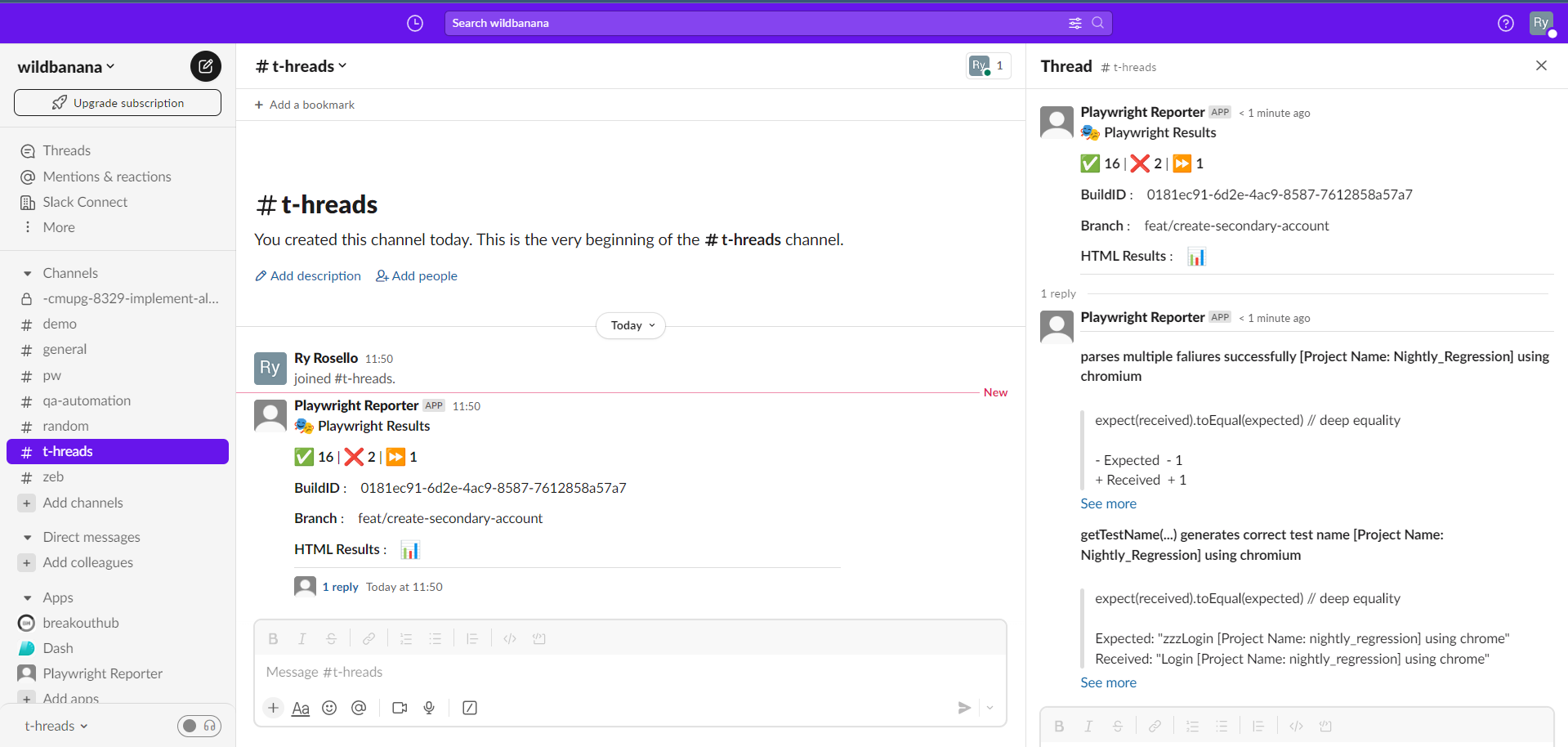
sendCustomBlocksInThreadAfterIndex (default: undefined)
Instructs the reporter to send blocks provided by your custom layout to a thread following the index specified. Example:
sendCustomBlocksInThreadAfterIndex: 3
This option applies to bot delivery; webhooks do not support this reporter's thread splitting.
proxy (optional)
String representation of your proxy server. Example:
proxy: "http://proxy.mycompany.com:8080",
meta (default: empty array)
The meta data to be sent to Slack. This is useful for providing additional context to your test run.
Examples:
...
meta: [
  {
    key: 'Suite',
    value: 'Nightly full regression',
  },
  {
    key: 'GITHUB_REPOSITORY',
    value: 'octocat/telsa-ui',
  },
  {
    key: 'GITHUB_REF',
    value: process.env.GITHUB_REF,
  },
],
...
Run-level errors and interruptions
The reporter captures Playwright's global onError events and the final run
status from onEnd. Setup/teardown errors, worker errors, global timeouts, and
gracefully interrupted runs can therefore notify Slack even when the failed-test
count is zero. An actual Playwright "No tests found" error also sends a failure
notification; a clean empty run without errors stays silent.
The default layout shows an unsuccessful run status above the details. Global
errors are separate from test failures, so they do not inflate test counts.
With showInThread: true, bot reports put both kinds of error details in the
report's thread while retaining the run status in the parent. Webhook reports
show the details inline with showInThread left false.
Custom layouts receive these optional SummaryResults fields:
| Field | Meaning |
|---|---|
runStatus | passed, failed, timedout, or interrupted |
runErrors | Global error strings with ANSI formatting removed; absent when there are none |
Use both fields when deciding whether a custom layout should display success;
failed === 0 alone does not imply that the whole run succeeded. Existing custom
layouts retain control of their output and must render these fields themselves.
See the summary fields and success check for examples.
Notifications require Playwright to reach the reporter's completion callback;
forced termination, SIGKILL, or loss of the CI machine can prevent delivery.