Custom message layouts
You can define your own Slack message layout to suit your needs. First configure a working reporter. Reporter callbacks use layout or layoutAsync; the CLI loads an exported function from a separate file.
Define a layout
For ready-to-adapt examples, visit the layout gallery: build summary, failure triage, flaky test watch, run context, and failure artifacts, each with a screenshot preview, downloadable source, and sample Block Kit JSON.
Firstly, install the necessary type definitions:
yarn add @slack/types -D
Next, define your layout function. The signature of this function should adhere to example below:
import { Block, KnownBlock } from '@slack/types';
import { SummaryResults } from 'playwright-slack-report/dist/src';

const generateCustomLayout = (
  summaryResults: SummaryResults,
): Array<KnownBlock | Block> => {
  // Replace this block with your own implementation.
  return [
    {
      type: 'section',
      text: { type: 'mrkdwn', text: `Failed tests: ${summaryResults.failed}` },
    },
  ];
};

export { generateCustomLayout };
In your, playwright.config.ts file, add your function into the config.
  import { generateCustomLayout } from "./my_custom_layout";

  ...

  reporter: [
    [
      "./node_modules/playwright-slack-report/dist/src/SlackReporter.js",
      {
        channels: ["pw-tests", "ci"], // provide one or more Slack channels
        sendResults: "always", // "always" , "on-failure", "off"
        layout: generateCustomLayout,
        ...
      },
    ],
  ],
Pro Tip: You can use the block-kit provided by Slack when creating your layout.
Summary results
Layout callbacks receive SummaryResults from playwright-slack-report/dist/src:
| Field | Meaning |
|---|---|
passed, failed, skipped, flaky | Test outcome counts; flaky may be undefined. Global errors do not inflate these counts. |
failures | Test failures as { suite, test, failureReason, artifacts? }. With artifactLinks configured, artifacts contains hosted { name, url, contentType? } links. |
tests | Test details, including suite/name, status, project/browser, timestamps, retries, reasons, tags, and optional attachments. |
meta | Optional array of { key, value } supplied in the configuration. |
flakyTests | Optional array of { suite, test, projectName, file, retries }; retries count actual attempts after the initial one, once per test/project/repetition. |
runStatus | Optional overall status: passed, failed, timedout, or interrupted. |
runErrors | Optional global error strings with ANSI formatting removed; absent when there are none. |
Use runStatus and runErrors alongside failed when deciding whether the run succeeded. failed === 0 alone does not imply success: setup/teardown errors, worker errors, timeouts, or interruptions can occur without a failed test. Global errors must remain visible even if the CLI's --run-status override is passed.
The default layout's display limits do not trim the complete arrays passed to your callback. Custom layouts control their own output, including rendering run status, global errors, and flaky details. The simple examples below include run status and error counts; extend them with error text or other details as needed. See run-level errors and delivery limits.
Use layoutAsync for asynchronous work such as uploading attachments. For bot messages, sendCustomBlocksInThreadAfterIndex can move later blocks into a thread.
Examples
Simple summary
import { Block, KnownBlock } from '@slack/types';
import { SummaryResults } from 'playwright-slack-report/dist/src';

export default function generateCustomLayoutSimpleExample(
  summaryResults: SummaryResults,
): Array<Block | KnownBlock> {
  return [
    {
      type: 'section',
      text: {
        type: 'mrkdwn',
        text:
          summaryResults.failed === 0 &&
          (!summaryResults.runStatus ||
            summaryResults.runStatus === 'passed') &&
          !summaryResults.runErrors?.length
            ? ':tada: Run completed successfully!'
            : `⚠️ Run ${summaryResults.runStatus && summaryResults.runStatus !== 'passed' ? summaryResults.runStatus : 'failed'}: ${summaryResults.failed} failure(s) out of ${summaryResults.tests.length} tests; ${summaryResults.runErrors?.length || 0} global error(s)`,
      },
    },
  ];
}
Example of the summary layout (the screenshot shows the original success wording):
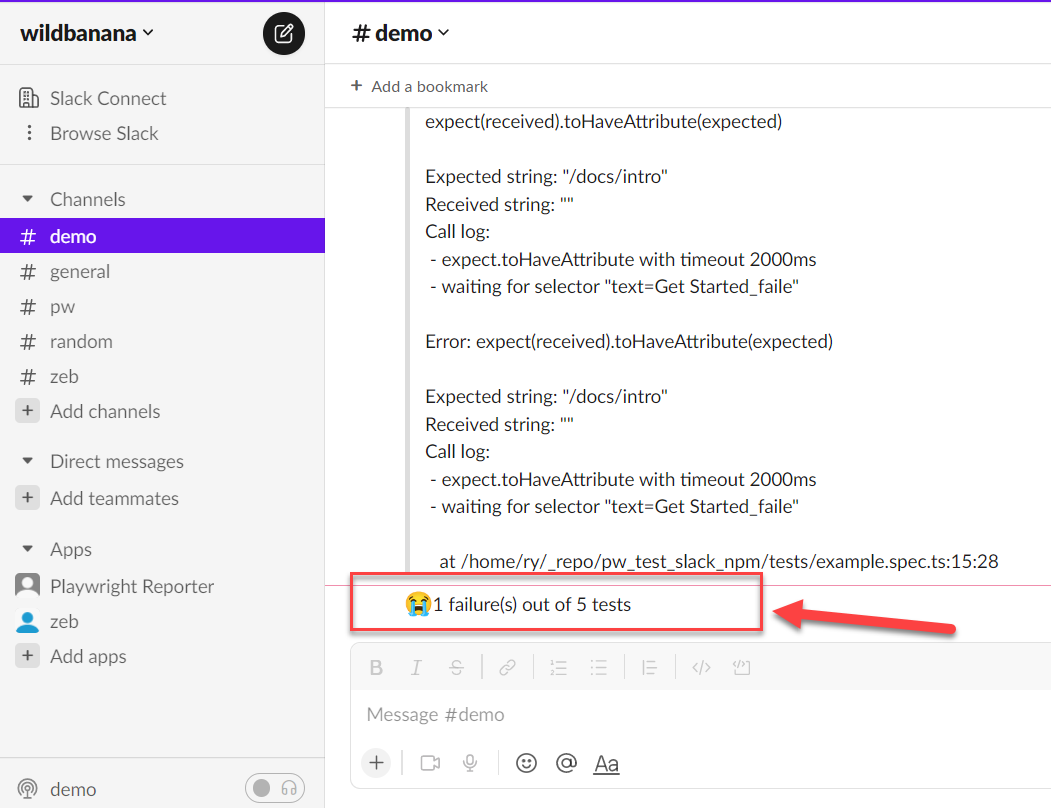
Summary with metadata
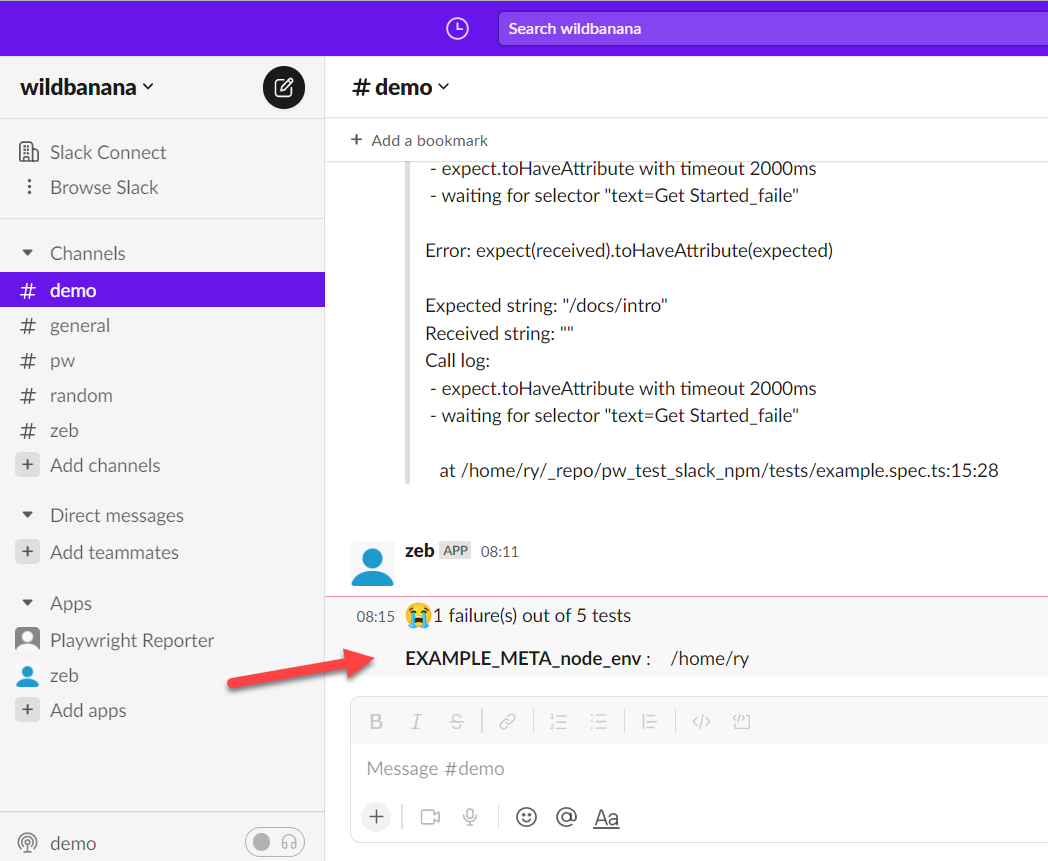
Import the example below with import generateCustomLayout from './my_custom_layout', then add the metadata and layout callback to your reporter config:
  reporter: [
    [
      "./node_modules/playwright-slack-report/dist/src/SlackReporter.js",
      {
        channels: ["demo"],
        sendResults: "always", // "always" , "on-failure", "off",
        layout: generateCustomLayout,
        meta: [
          {
            key: 'EXAMPLE_META_node_env',
            value: process.env.HOME ,
          },
        ],
      },
    ],
  ],
Create the function to generate the layout:
import { Block, KnownBlock } from '@slack/types';
import { SummaryResults } from 'playwright-slack-report/dist/src';

export default function generateCustomLayoutSimpleMeta(
  summaryResults: SummaryResults,
): Array<Block | KnownBlock> {
  const meta: Array<Block | KnownBlock> = [];
  if (summaryResults.meta) {
    for (let i = 0; i < summaryResults.meta.length; i += 1) {
      const { key, value } = summaryResults.meta[i];
      meta.push({
        type: 'section',
        text: {
          type: 'mrkdwn',
          text: `\n*${key}* :\t${value}`,
        },
      });
    }
  }
  return [
    {
      type: 'section',
      text: {
        type: 'mrkdwn',
        text:
          summaryResults.failed === 0 &&
          (!summaryResults.runStatus ||
            summaryResults.runStatus === 'passed') &&
          !summaryResults.runErrors?.length
            ? ':tada: Run completed successfully!'
            : `⚠️ Run ${summaryResults.runStatus && summaryResults.runStatus !== 'passed' ? summaryResults.runStatus : 'failed'}: ${summaryResults.failed} failure(s) out of ${summaryResults.tests.length} tests; ${summaryResults.runErrors?.length || 0} global error(s)`,
      },
    },
    ...meta,
  ];
}
Example of the summary layout (the screenshot shows the original success wording):
Screenshots and videos using AWS S3
Install @aws-sdk/client-s3 and configure S3_ACCESS_KEY, S3_SECRET, S3_REGION, and S3_BUCKET. The generated attachment URLs must be accessible to their intended viewers.
In your, playwright.config.ts file, add these params (Make sure you use layoutAsync rather than layout):
  import { generateCustomLayoutAsync } from "./my_custom_layout";
  ...
  reporter: [
    [
      "./node_modules/playwright-slack-report/dist/src/SlackReporter.js",
      {
        ...
        layoutAsync: generateCustomLayoutAsync,
        ...
      },
    ],
  ],
  use: {
    ...
    screenshot: "only-on-failure",
    video: "retain-on-failure",
    ...
  },
Create the function to generate the layout asynchronously in my_custom_layout.ts:
import fs from 'fs';
import path from 'path';
import { Block, KnownBlock } from '@slack/types';
import { SummaryResults } from 'playwright-slack-report/dist/src';
import { PutObjectCommand, S3Client } from '@aws-sdk/client-s3';

const s3Client = new S3Client({
  credentials: {
    accessKeyId: process.env.S3_ACCESS_KEY || '',
    secretAccessKey: process.env.S3_SECRET || '',
  },
  region: process.env.S3_REGION,
});

async function uploadFile(filePath, fileName) {
  try {
    const ext = path.extname(filePath);
    const name = `${fileName}${ext}`;

    await s3Client.send(
      new PutObjectCommand({
        Bucket: process.env.S3_BUCKET,
        Key: name,
        Body: fs.createReadStream(filePath),
      }),
    );

    return `https://${process.env.S3_BUCKET}.s3.${process.env.S3_REGION}.amazonaws.com/${name}`;
  } catch (err) {
    console.log('🔥🔥 Error', err);
  }
}

export async function generateCustomLayoutAsync(
  summaryResults: SummaryResults,
): Promise<Array<KnownBlock | Block>> {
  const { tests } = summaryResults;
  // create your custom slack blocks

  const header = {
    type: 'header',
    text: {
      type: 'plain_text',
      text: '🎭 *Playwright E2E Test Results*',
      emoji: true,
    },
  };

  const summary = {
    type: 'section',
    text: {
      type: 'mrkdwn',
      text: `✅ *${summaryResults.passed}* | ❌ *${summaryResults.failed}* | ⏩ *${summaryResults.skipped}*\nRun status: ${summaryResults.runStatus || 'not provided'}\nGlobal errors: ${(summaryResults.runErrors || []).join('\n') || 'none'}`,
    },
  };

  const fails: Array<KnownBlock | Block> = [];

  for (const t of tests) {
    if (t.status === 'failed' || t.status === 'timedOut') {
      fails.push({
        type: 'section',
        text: {
          type: 'mrkdwn',
          text: `👎 *[${t.browser}] | ${t.suiteName.replace(/\W/gi, '-')}*`,
        },
      });

      const assets: Array<string> = [];

      if (t.attachments) {
        for (const a of t.attachments) {
          // Upload failed tests screenshots and videos to the service of your choice
          // In my case I upload the to S3 bucket
          const permalink = await uploadFile(
            a.path,
            `${t.suiteName}--${t.name}`.replace(/\W/gi, '-').toLowerCase(),
          );

          if (permalink) {
            let icon = '';
            if (a.name === 'screenshot') {
              icon = '📸';
            } else if (a.name === 'video') {
              icon = '🎥';
            }

            assets.push(`${icon}  See the <${permalink}|${a.name}>`);
          }
        }
      }

      if (assets.length > 0) {
        fails.push({
          type: 'context',
          elements: [{ type: 'mrkdwn', text: assets.join('\n') }],
        });
      }
    }
  }

  return [header, summary, { type: 'divider' }, ...fails];
}
Upload attachments directly to Slack
To enable this functionality, make sure the slackbot user has the following additional scopes:
files:writefiles:read
You will need to re-install the app and re-invite the bot into the channel.
The value of the channel_id should be the channel id of the channel you want to upload the file to. This channel id can be found in the url when you are in the channel. e.g.
https://app.slack.com/client/T02RVEEFPDH/C05H7TKVDUK
^ the bit starting with 'C...' is your channel id. In this case, the channel id is C05H7TKVDUK
import web_api_1 from '@slack/web-api';
import fs from 'fs';
import { Block, KnownBlock } from '@slack/types';
import { SummaryResults } from 'playwright-slack-report/dist/src';
const slackClient = new web_api_1.WebClient(
  process.env.SLACK_BOT_USER_OAUTH_TOKEN,
);

async function uploadFile(
  filePath: string,
): Promise<web_api_1.FilesCompleteUploadExternalResponse[] | undefined> {
  try {
    const result = await slackClient.filesUploadV2({
      channel_id: 'C05H7TKVDUK', // << this is the channel id not channel name! ☠️
      file: fs.createReadStream(filePath),
      filename: filePath.split('/').at(-1),
    });

    return result.files;
  } catch (error) {
    console.log('🔥🔥 error', error);
  }
}

export default async function generateCustomLayout(
  summaryResults: SummaryResults,
): Promise<({ type: string; text: { type: string; text: string } } | Block)[]> {
  const header = {
    type: 'header',
    text: {
      type: 'plain_text',
      text: '🎭 *Playwright E2E Test Results*',
      emoji: true,
    },
  };

  const summary = {
    type: 'section',
    text: {
      type: 'mrkdwn',
      text: `✅ *${summaryResults.passed}* | ❌ *${summaryResults.failed}* | ⏩ *${summaryResults.skipped}*\nRun status: ${summaryResults.runStatus || 'not provided'}\nGlobal errors: ${(summaryResults.runErrors || []).join('\n') || 'none'}`,
    },
  };

  const fails: Array<KnownBlock | Block> = [];
  const { tests } = summaryResults;
  for (const test of tests) {
    if (test.attachments) {
      for (const attachment of test.attachments) {
        const uploadResult = await uploadFile(attachment.path);

        if (uploadResult && uploadResult[0].files) {
          const { name, permalink } = uploadResult[0].files[0];
          if (name === 'image' && permalink) {
            fails.push({
              alt_text: '',
              image_url: permalink,
              title: { type: 'plain_text', text: name || '' },
              type: 'image',
            });
          }

          if (name === 'video' && permalink) {
            fails.push({
              alt_text: '',
              // NOTE:
              // Slack requires thumbnail_url length to be more that 0
              // Either set screenshot url as the thumbnail or add a placeholder image url
              thumbnail_url: '',
              title: { type: 'plain_text', text: name || '' },
              type: 'video',
              video_url: permalink,
            });
          }
        }
      }
    }
  }
  return [header, summary, ...fails];
}